Kennisbank
1.000 veelgestelde vragen, 500 tutorials en uitlegvideo's. Hier vind je alleen maar oplossingen!
Ticketing: profielen beheren
Bijwerken 13-08-2026
Met profielen kunt u rechten definiëren voor de verkoop, het beheer van tickets (scanners) en de toegang tot de beheeromgeving (Infomaniak Manager). Profielen kunnen worden gebruikt voor zelfstandig scannen, met vooraf ingestelde instellingen, door toegangscodes te gebruiken die u zelf aanmaakt.
Een profiel aanmaken
U kunt profielen toewijzen aan uw gebruikers. Als u meer gebruikers wilt toevoegen, kunt u dat doen in het gebruikersbeheer van uw organisatie.
- Klik hier om naar het beheer van uw product in het Infomaniak-beheerportaal te gaan (hulp nodig?).
- Klik rechtstreeks op de naam van het ticketingsysteem dat aan het evenement is gekoppeld.
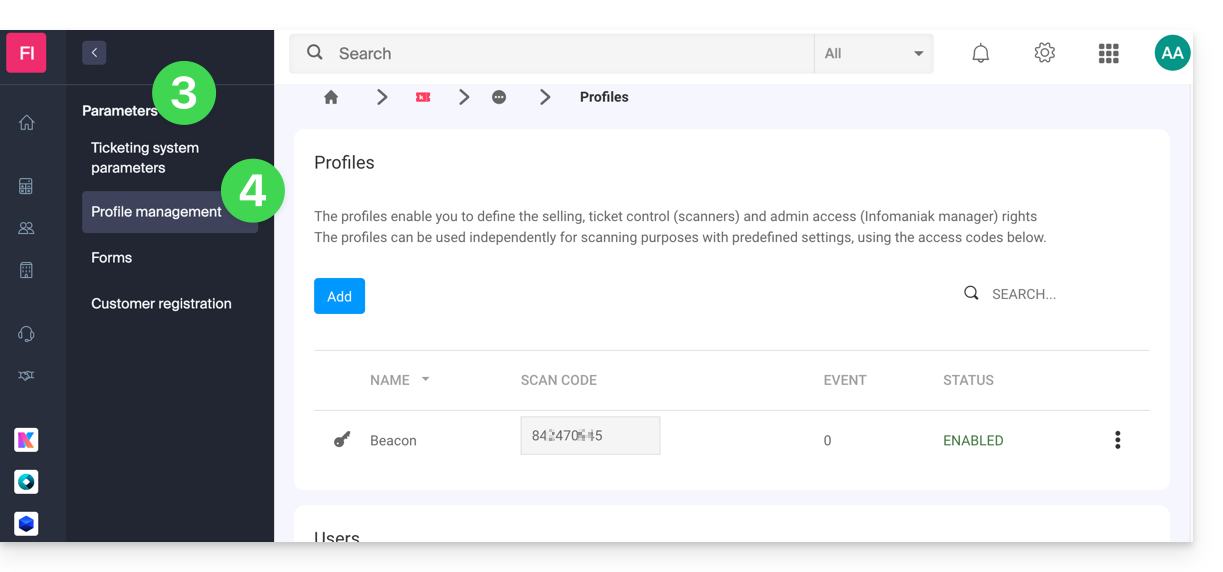
- Klik op Instellingen in het linkermenu.
- Klik op Profielbeheer in het linkermenu:
Link naar deze veelgestelde vragen: https://faq.infomaniak.com/2649
Is deze veelgestelde vragenlijst nuttig geweest?