Kennisbank
1.000 veelgestelde vragen, 500 tutorials en uitlegvideo's. Hier vind je alleen maar oplossingen!
De data-analyse van kDrive begrijpen
Deze handleiding legt uit waarom analyses worden uitgevoerd op uw gegevens in kDrive wanneer u Infomaniak deze toestemming verleent, en hoe u deze kunt intrekken.
Inleiding
- De vertrouwelijkheid van de gegevens die op kDrive zijn opgeslagen, is een belangrijk onderwerp, vooral wanneer mensen deze gegevens af en toe analyseren:
- Het analyseren van gegevens is essentieel voor het verbeteren van kunstmatige intelligentie (AI), omdat het mogelijk maakt om AI-modellen te voorzien van hoogwaardige gegevens. Hierdoor kunnen de zoekresultaten in uw kDrive en de automatische categorisering worden verbeterd.
- De gegevens worden uitsluitend voor deze specifieke doeleinden gebruikt.
- De AI scant het bestand om de inhoud en alle bijbehorende informatie te extraheren. Op basis van al deze informatie wordt de categorie bepaald die het meest waarschijnlijk overeenkomt met het document.
- Als het model twijfelt, wordt het bestand niet gecategoriseerd om fouten te voorkomen.
- Lees deze andere handleiding over het gebruikte model en de verantwoordelijkheden van elke partij.
Volledig intern analyseren
Infomaniak zet zich in om de gegevens van haar klanten te beschermen en de geldende privacyregels na te leven. Het is overigens zeer ongebruikelijk dat een medewerker handmatig ingrijpt in dit analysesysteem, omdat hoewel de technische mogelijkheid bestaat (vandaar deze mededeling), dit in de praktijk niet wordt gedaan.
Uiteraard is Infomaniak de enige partij die bij deze data-analyse betrokken is. Infomaniak staat geen derden toe om in te grijpen in haar systemen, om de veiligheid en vertrouwelijkheid van deze gegevens te waarborgen.
De verleende rechten intrekken
Vereisten
- U moet beheerder of wettelijk vertegenwoordiger zijn binnen de organisatie die het kDrive beheert.
Vervolgens kunt u uw gegevensverwerkingsstatus controleren door in te loggen op uw kDrive en vervolgens te klikken op:
- Klik hier om toegang te krijgen tot de web-app kDrive van Infomaniak (online service ksuite.infomaniak.com/kdrive).
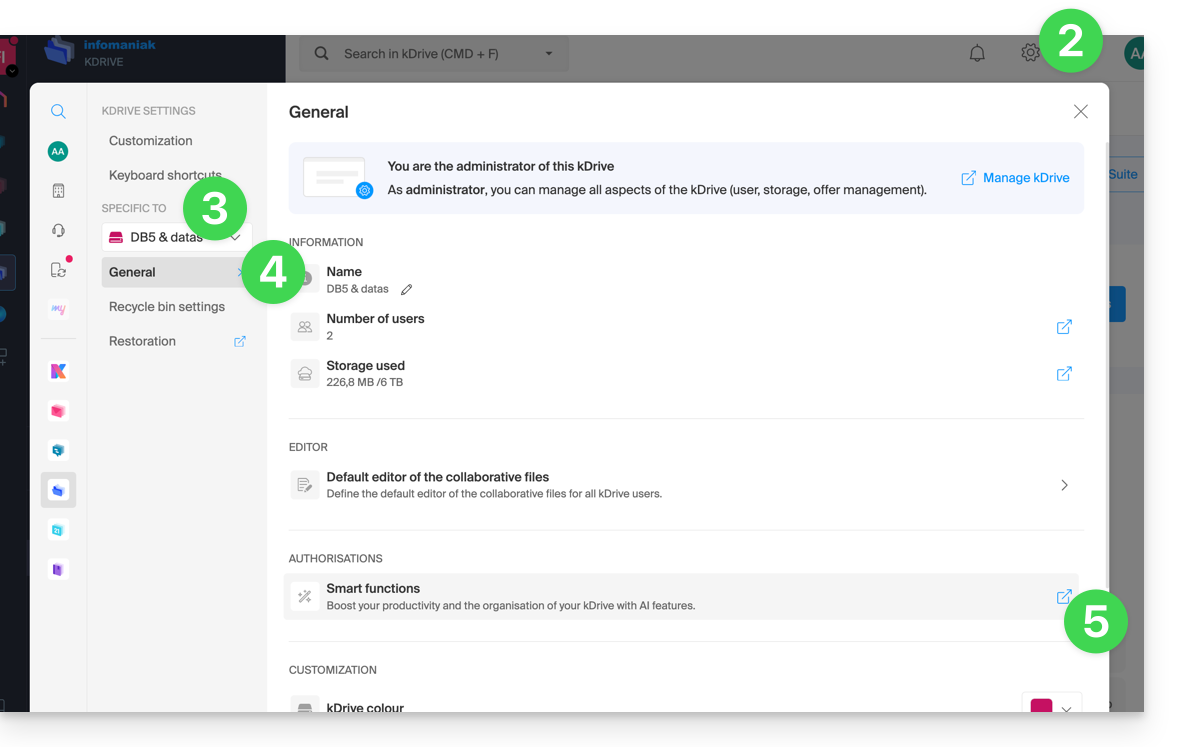
- Klik op het pictogram Instellingen rechtsboven.
- Controleer of selecteer de betreffende kDrive in het vervolgkeuzemenu in het linkermenu.
- Klik op Algemeen in het linkermenu.
- Klik op Slimme functies:
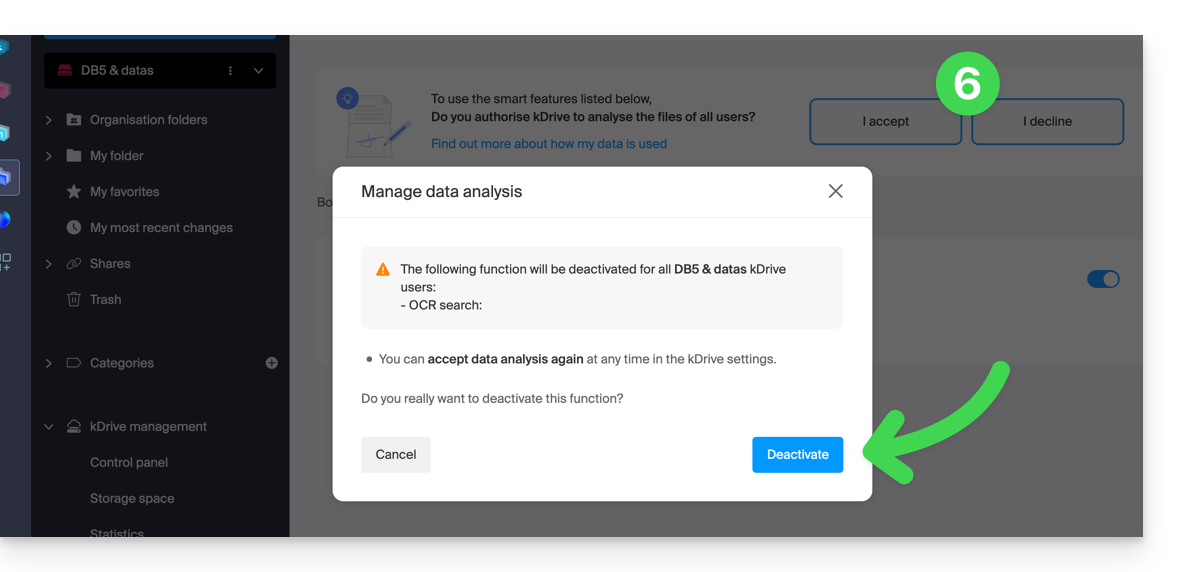
- Klik op de knop om de gewenste actie uit te voeren:
Link naar deze veelgestelde vragen: https://faq.infomaniak.com/2412
Is deze veelgestelde vragenlijst nuttig geweest?