Kennisbank
1.000 veelgestelde vragen, 500 tutorials en uitlegvideo's. Hier vind je alleen maar oplossingen!
DynDNS van Infomaniak gebruiken met FritzBox
Bijwerken 05-10-2026
Deze handleiding legt uit hoe u via een domeinnaam toegang krijgt tot een Fritzbox die is verbonden met internet en een dynamisch IP-adres heeft.
Vereisten
- U moet een apparaat hebben waarmee u een aangepaste dynamische DNS-provider kunt configureren.
- Er moet een dynamische DNS-record zijn aangemaakt voor het betreffende domein via het Infomaniak-beheerpaneel (❓: hulp).
Een Fritz!Box koppelen aan een domeinnaam
Ga als volgt te werk:
- Open de beheerdersinterface van de Fritzbox en schakel indien nodig de geavanceerde modus in.
- Ga naar Internet en vervolgens naar Toegangsautorisatie.
- Klik op het tabblad Dynamische DNS:
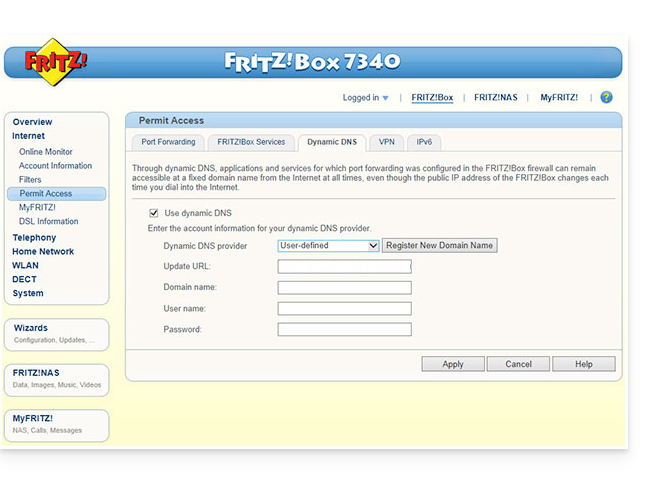
- Kies de provider: “Aangepast”.
- Vul de volgende velden in:
- Update-URL (zoals hieronder weergegeven, of vervang
ipaddrdoorip6addrals u wilt dat Fritzbox de "placeholder" vervangt door het IPv6-adres in plaats van het IPv4-adres):https://infomaniak.com/nic/update?system=dyndns&hostname=<domain>&myip=<ipaddr> - Domeinnaam:
de URLdie is geconfigureerd in het beheerpaneel bij het toevoegen van de Dynamic DNS (❓: hulp). - Gebruikersnaam:
de gebruikersnaamdie is gedefinieerd in het beheerpaneel bij het toevoegen van de Dynamic DNS (❓: hulp). - Wachtwoord:
het wachtwoorddat is gedefinieerd in het beheerpaneel bij het toevoegen van de Dynamic DNS (❓: hulp).
- Update-URL (zoals hieronder weergegeven, of vervang
- Klik op Toepassen om te voltooien.
Link naar deze veelgestelde vragen: https://faq.infomaniak.com/2400
Is deze veelgestelde vragenlijst nuttig geweest?