Kennisbank
1.000 veelgestelde vragen, 500 tutorials en uitlegvideo's. Hier vind je alleen maar oplossingen!
Een Infomaniak Synology NAS opzeggen
Bijwerken 07-09-2026
Deze handleiding legt uit hoe u een gehuurde Synology NAS bij Infomaniak volledig kunt opzeggen.
Inleiding
- Voor de meeste producten moet u de opzegging per e-mail bevestigen, anders worden er geen gegevens verwijderd.
- Openstaande kosten en kosten die buiten het abonnement vallen, blijven verschuldigd.
- Een bevestiging van de opzegging wordt naar eventuele andere beheerders van de organisatie gestuurd.
- Bij de opzegging worden de back-ups onherroepelijk verwijderd, waardoor een herstel niet meer mogelijk is.
Het Synology-abonnement opzeggen
Om het abonnement op te zeggen, gaat u naar:
- Klik hier om naar het beheer van uw product in het Infomaniak-beheerportaal te gaan (hulp nodig?).
- Klik op het menu met acties ⋮ rechts van het betreffende item.
- Kies Opzeggen:
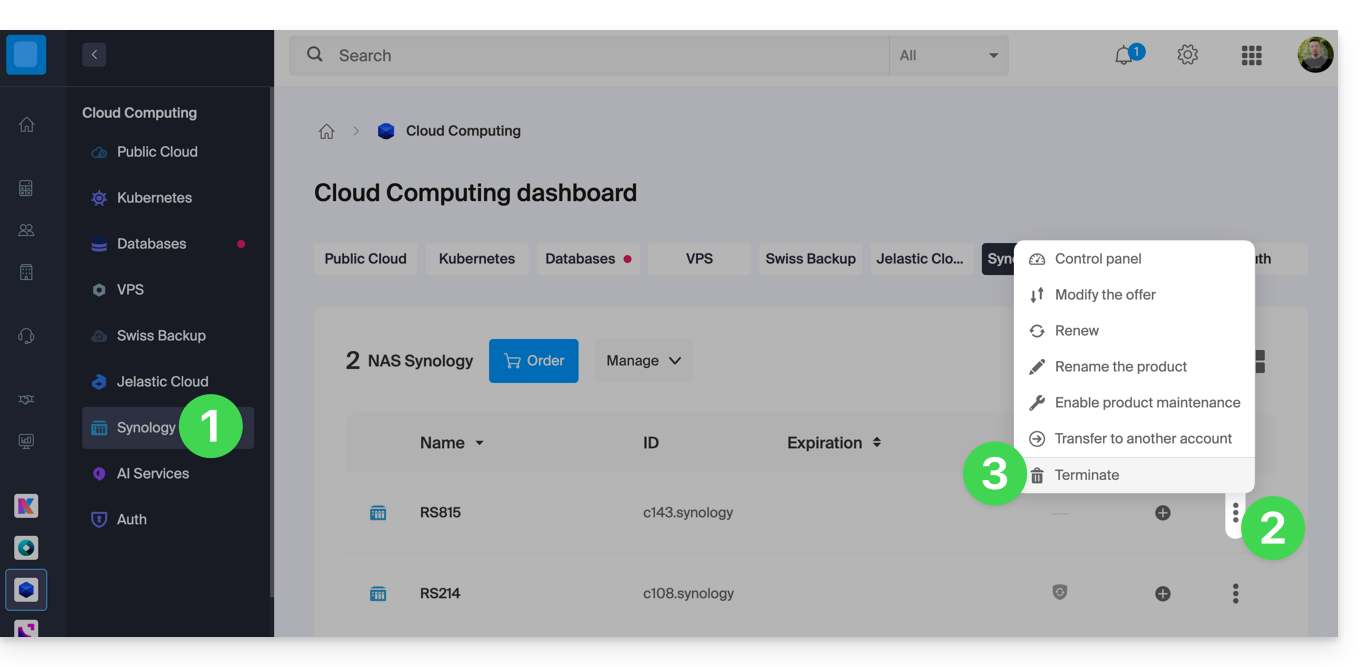
- Volg de procedure tot het einde.
Link naar deze veelgestelde vragen: https://faq.infomaniak.com/2085
Is deze veelgestelde vragenlijst nuttig geweest?