Kennisbank
1.000 veelgestelde vragen, 500 tutorials en uitlegvideo's. Hier vind je alleen maar oplossingen!
Delete one or more email addresses
Bijwerken 23-11-2026
This guide explains how to delete an email address from the Infomaniak Mail Service.
Introduction
- If you want to delete a my kSuite or my kSuite+ address (ik.me, etik.com, ikmail.com), please refer to this other guide.
Delete one or more email addresses
Prerequisites
- You must have a Mail Service on your Infomaniak Manager (❓: help).
- You must be at least an Administrator of the Organization (❓: help).
To remove an email address, go to the Mail Service dashboard. To remove an email address (its content will be permanently deleted):
- Click here to access the Mail Service management in your Infomaniak Manager (❓: help).
- Click on the name of the Mail Service in question.
Once you are on the email address management page: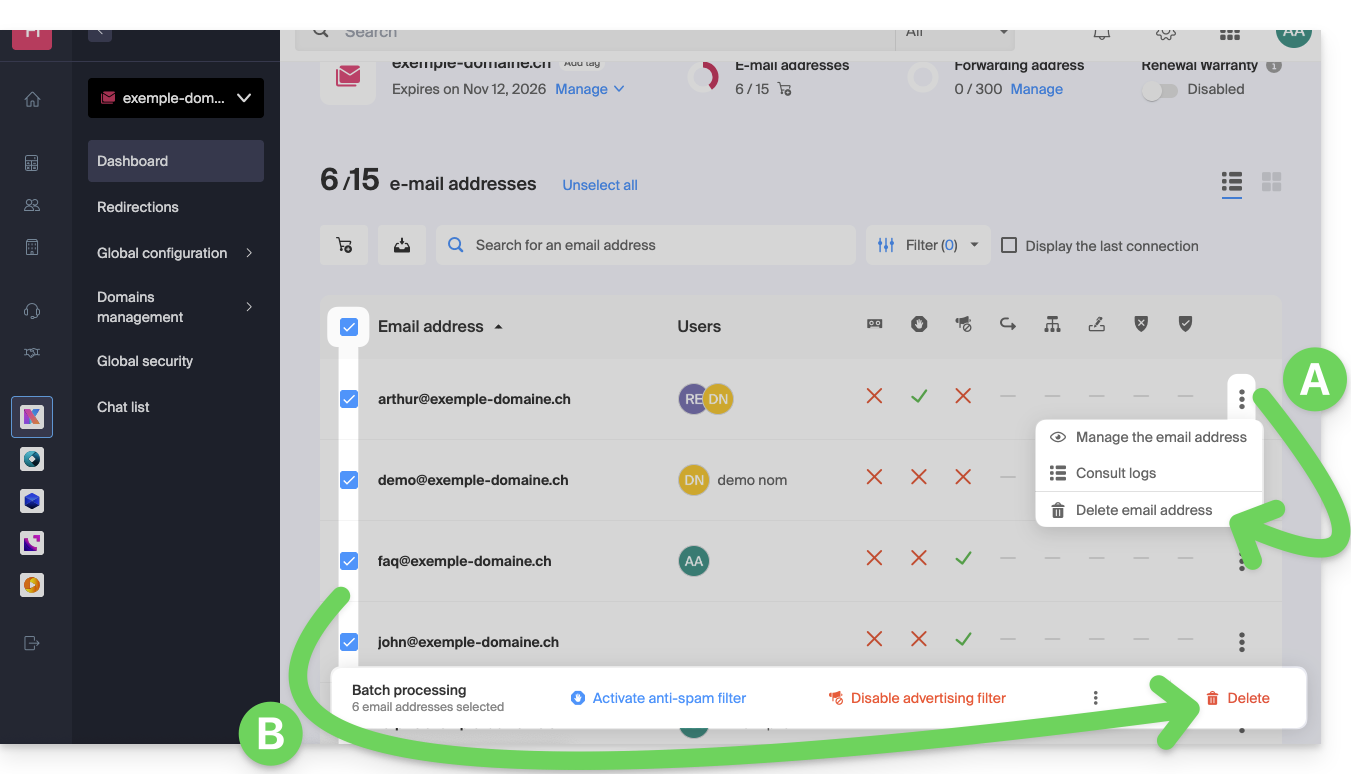
A. Delete addresses one by one
- Click on the action menu ⋮ located to the right of the item in question.
- Choose to delete the email address.
B. Delete multiple addresses at once
- Select the addresses to delete by checking the boxes to the left of each line.
- Click on Delete at the bottom of the screen.
Link naar deze veelgestelde vragen: https://faq.infomaniak.com/2066
Is deze veelgestelde vragenlijst nuttig geweest?