Kennisbank
1.000 veelgestelde vragen, 500 tutorials en uitlegvideo's. Hier vind je alleen maar oplossingen!
Show Mail Infomaniak keyboard shortcuts
This guide explains how to increase your productivity with the Infomaniak Web Mail app (online service ksuite.infomaniak.com/mail) by using its keyboard shortcuts, which allow you to perform certain actions without using the mouse.
Enable or disable shortcuts
To enable or disable keyboard shortcuts throughout the Infomaniak Mail interface:
- Click here to access your emails in your Infomaniak kSuite (❓: help).
- Click on Settings in the top right corner.
- Click on Shortcuts.
- Enable or disable the use of shortcuts:
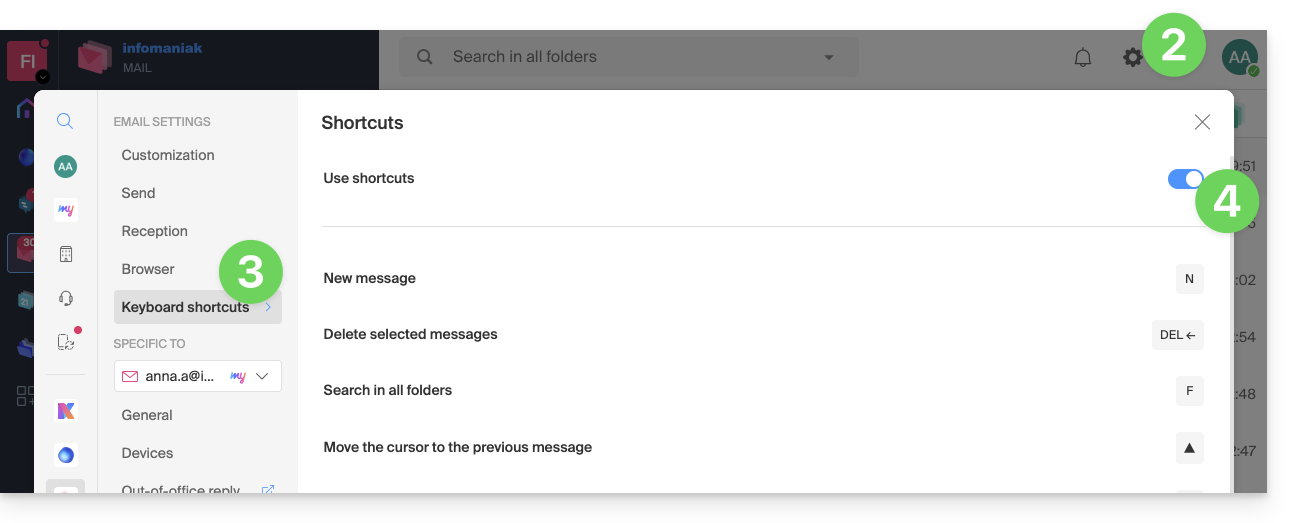
You can also access it using the key combination SHIFT+ALT+H (OPTION+MAJ+H on macOS).
Keyboard shortcut examples
Here are some keyboard shortcuts (refer to the chapters above to go directly to the complete list):
| Keyboard shortcuts | Definition | Action |
|---|---|---|
SHIFT+ALT+H | List of shortcuts | Displays the complete list of keyboard shortcuts available in Webmail. |
! | First message | Allows you to select the first message in the current folder |
SHIFT+LT+A | All messages | Allows you to select all messages in the current folder |
| DOWN | Next message | Allows you to move the cursor to the next message. |
| UP | Previous message | Moves the cursor to the previous message. |
| LEFT | Return to the message list | Return to the message list |
SHIFT+CLICK | Select multiple messages | Allows you to select multiple messages consecutively |
CMD/WINDOWS+CLICK | Select/Deselect a message | Allows you to select/deselect a message |
SHIFT+R | Reply to the message | Allows you to reply to the message sender |
SHIFT+ALT+R | Reply to all | Allows you to reply to the sender and all recipients in the message. |
SHIFT+ALT+N | New message | Allows you to create a new message |
SHIFT+ALT+DEL | Deletes the selected messages | Deletes all selected messages at once |
SHIFT+ALT+E | Archive the message | Allows you to move the message to the archive folder. |
Link naar deze veelgestelde vragen: https://faq.infomaniak.com/1890
Is deze veelgestelde vragenlijst nuttig geweest?