Kennisbank
1.000 veelgestelde vragen, 500 tutorials en uitlegvideo's. Hier vind je alleen maar oplossingen!
Cancel a Cloud / Lite VPS
This guide explains how to completely cancel a Cloud VPS / VPS Lite.
Introduction
- For most products, confirm the cancellation request by email; otherwise, no data will be deleted.
- Any charges incurred and exceeding the included allowance will still be due.
- A cancellation confirmation is sent to any other administrators of the Organization.
- Backups will be permanently deleted upon cancellation, making any restoration impossible.
Cancel a server
To access the product cancellation options:
- Click here to access the management of your product in the Infomaniak Manager (need help?).
- Click on the action menu ⋮ located to the right of the item in question.
- Choose Cancel:
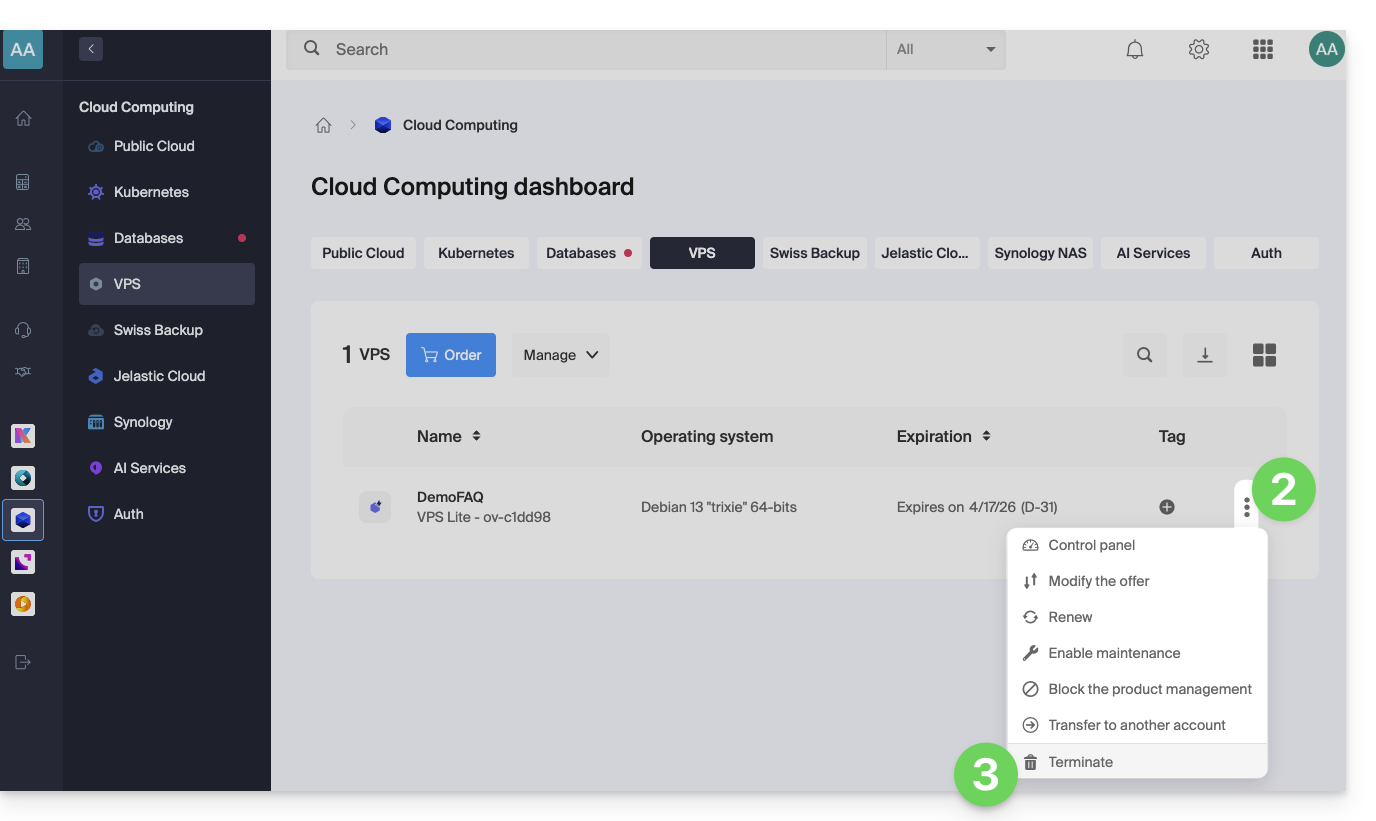
- Follow the procedure until the end.
Link naar deze veelgestelde vragen: https://faq.infomaniak.com/1702
Is deze veelgestelde vragenlijst nuttig geweest?