Kennisbank
1.000 veelgestelde vragen, 500 tutorials en uitlegvideo's. Hier vind je alleen maar oplossingen!
Een hostingaccount herstellen (specifieke gegevens)
Bijwerken 13-10-2026
Deze handleiding legt uit hoe u toegang krijgt tot automatische back-ups en hoe u een specifiek bestand van een website kunt herstellen op een Infomaniak-hostingpakket.
Specifieke bestanden of mappen herstellen
Hiervoor:
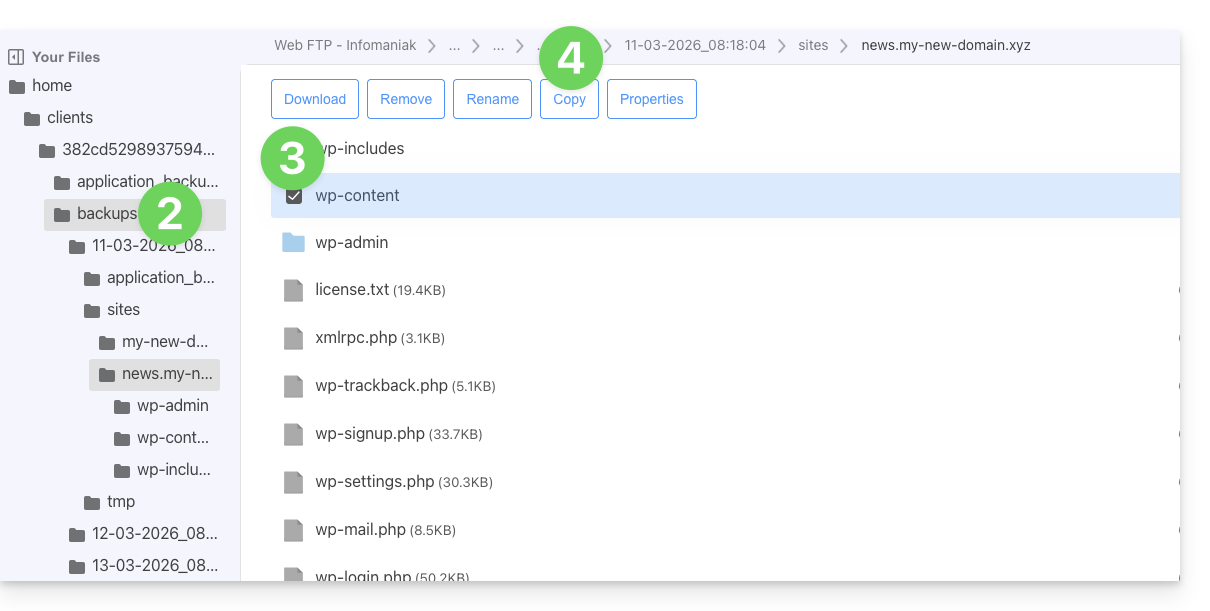
- Ga naar de FTP-server via Web FTP (hulp nodig?).
- Ga naar de map
/backups. - Selecteer de bestanden en/of mappen die u wilt herstellen.
- Klik op de knop Kopiëren:
- Selecteer de locatie waar u de gegevens naartoe wilt kopiëren/herstellen (de bestaande gegevens worden vervangen door de geselecteerde gegevens).
Link naar deze veelgestelde vragen: https://faq.infomaniak.com/1655
Is deze veelgestelde vragenlijst nuttig geweest?