Kennisbank
1.000 veelgestelde vragen, 500 tutorials en uitlegvideo's. Hier vind je alleen maar oplossingen!
Restrict access to a video stream to specific domains
Bijwerken 02-11-2026
This guide explains how to restrict access to Infomaniak video streaming feeds to only your own website.
This protection does not prevent the embedding of a stream via an HTML iframe tag. Use unique hash protection for a higher level of security.
Restrict access to broadcasts to a domain
To do this:
- Click here to access your product management interface in the Infomaniak Manager (need help?).
- Click directly on the name assigned to the product in question.
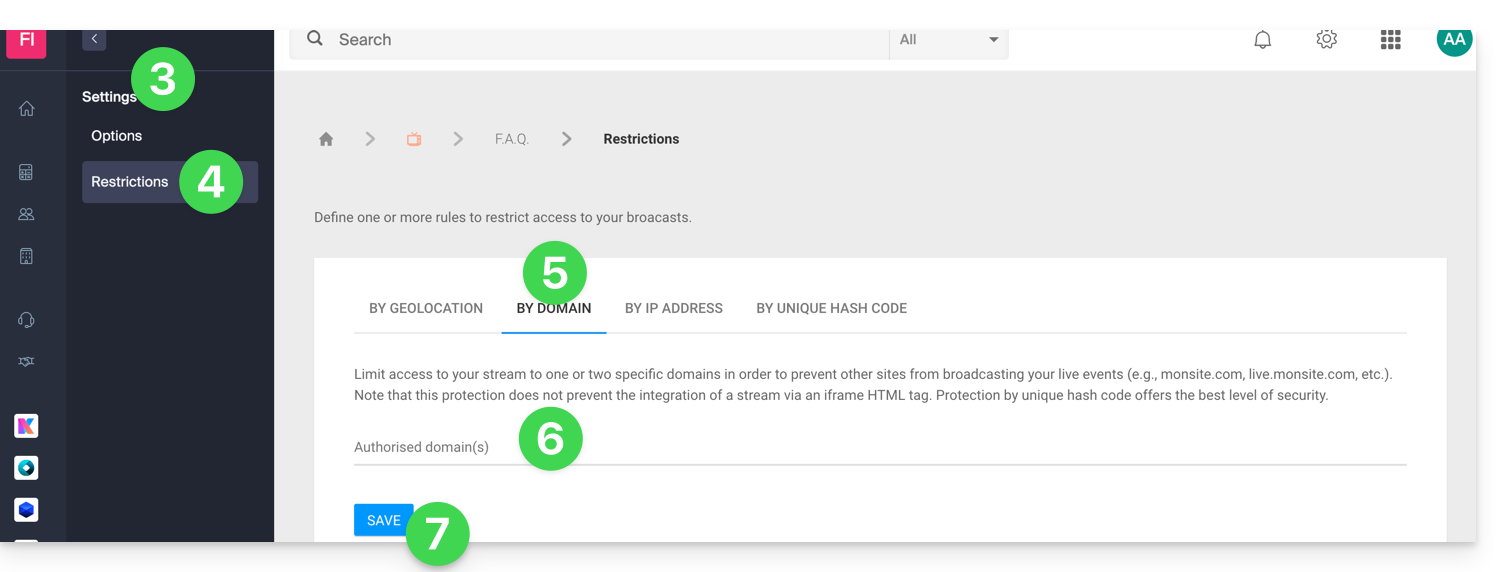
- Click on Settings in the left-hand menu.
- Click on Restrictions in the left-hand menu.
- Click on the Domain Restriction tab.
- Define the site(s) that must be specifically allowed to load the feed.
- Click the Save button:
Refer to this other guide to customize the replacement image offered to viewers who are blocked.
Link naar deze veelgestelde vragen: https://faq.infomaniak.com/1543
Is deze veelgestelde vragenlijst nuttig geweest?