Base de conhecimento
1000 perguntas frequentes, 500 tutoriais e vídeos explicativos. Aqui, você encontra apenas soluções!
Use Euria on the Infomaniak Web Mail app (summarize a discussion)
This guide allows you to quickly discover the essential functions of Euria, the artificial intelligence at your disposal within kSuite, particularly powerful for summarizing emails on the Infomaniak Web app Mail (online service ksuite.infomaniak.com/mail).
✘ UNAVAILABLE with
Free kSuite my kSuite
(ik.me, etik.com, ikmail.com)
Summarize an email
Prerequisites
- Read and understand this other guide about the model used and the responsibilities of each party.
To access the summary feature:
- Click here to access the Infomaniak Web app Mail (online service ksuite.infomaniak.com/mail).
- Log in with your Infomaniak account credentials (not your email password).
- Go to the email message you want to summarize (it can be in any folder).
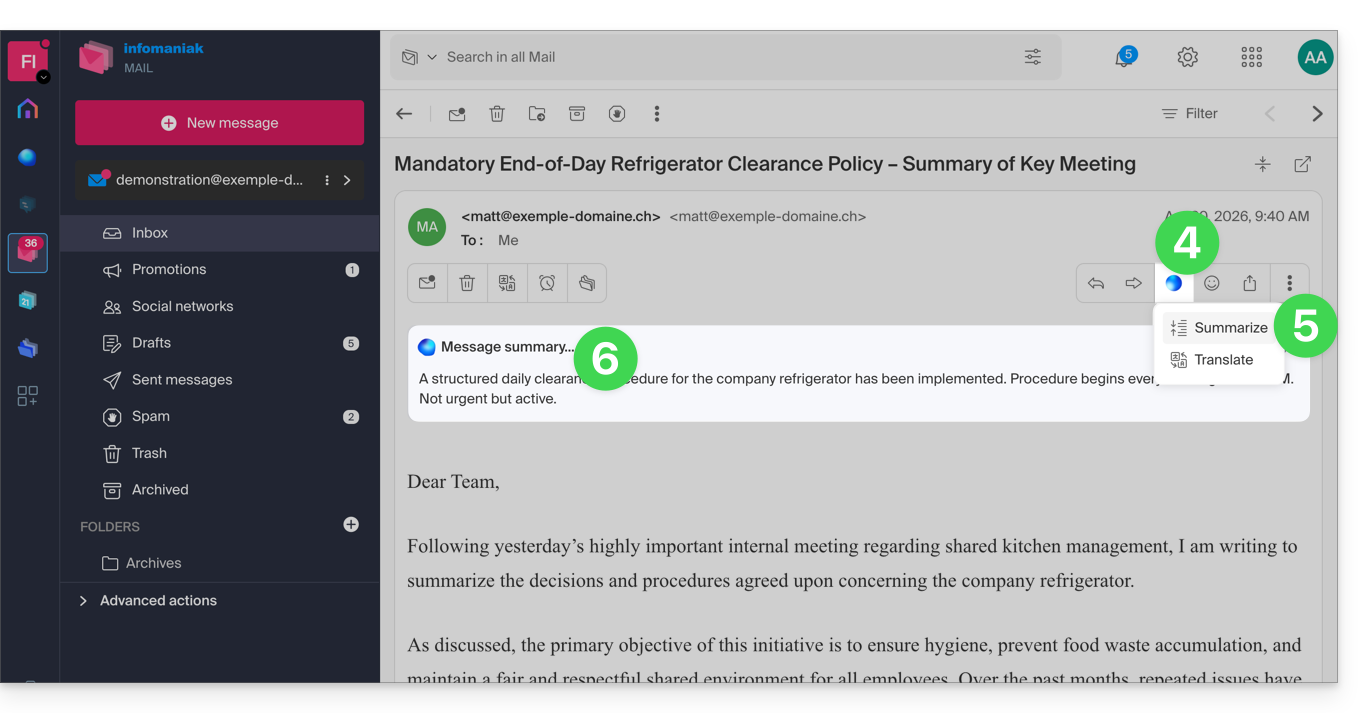
- Click on the Euria button located on the top toolbar.
- Click on Summarize.
- The summary of the message appears in a block above the original message (visible only to you):
Link para esta FAQ: https://faq.infomaniak.com/308
Esta seção de perguntas frequentes foi útil?