Base de conhecimento
1000 perguntas frequentes, 500 tutoriais e vídeos explicativos. Aqui, você encontra apenas soluções!
Gerenciar o número de IVA da organização
Este guia destina-se aos clientes da Infomaniak que possuem uma empresa registada num país da União Europeia (UE) e detalha como inserir ou modificar o seu número de IVA europeu para permitir a aplicação das regras de faturação adequadas.
Introdução
- As empresas da UE podem beneficiar do mecanismo de autoliquidação do IVA ao fornecerem um número de IVA intracomunitário válido. Neste caso, a Infomaniak não cobra o imposto, e cabe à empresa declarar e pagar o IVA no seu país de residência.
- Para uma empresa suíça, este número não é aplicável:
- A Suíça tem o seu próprio sistema fiscal, distinto do da UE.
- As empresas suíças estão sujeitas ao IVA suíço e não estão abrangidas pelos mecanismos de autoliquidação aplicáveis às trocas intracomunitárias da UE.
Adicione o seu número de IVA
Poderá inserir o seu número de IVA ao encomendar o seu primeiro produto Infomaniak, quando forem solicitadas as informações da empresa (correspondentes à sua Organização).
Para adicionar ou modificar o número de IVA a qualquer momento:
- Clique aqui para para acessar o gerenciamento das informações da sua organização no Gerenciador Infomaniak.
- Preencha o campo número de IVA:
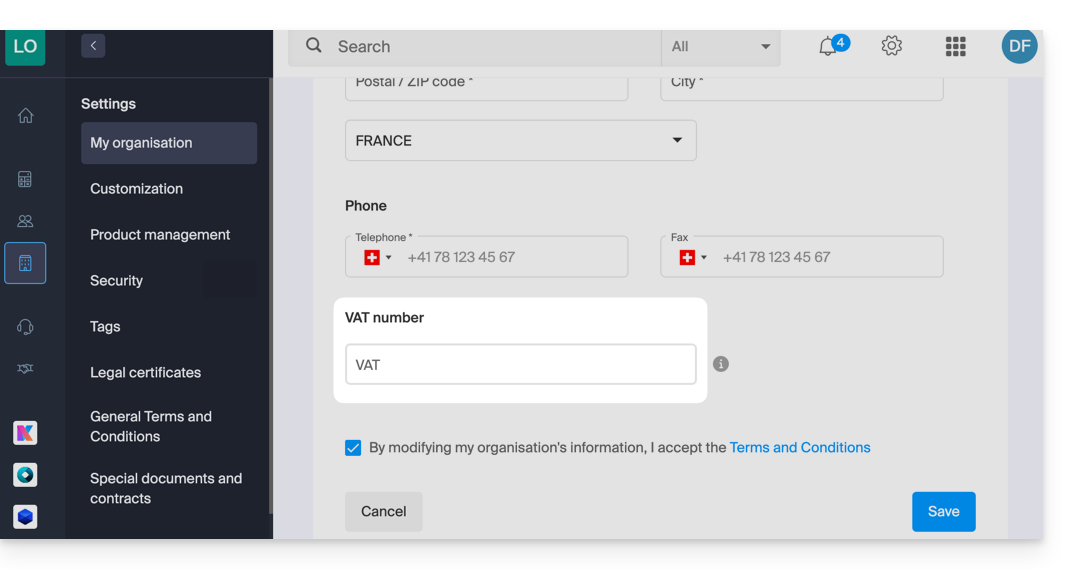
- Leia e marque a caixa dos Termos e Condições Gerais / Termos de Uso e, em seguida, clique em Guardar.
Se necessário, leia este outro guia sobre os outros parâmetros que podem ser modificados.
Link para esta FAQ: https://faq.infomaniak.com/2599
Esta seção de perguntas frequentes foi útil?