Base de conhecimento
1000 perguntas frequentes, 500 tutoriais e vídeos explicativos. Aqui, você encontra apenas soluções!
Terminate a VPS Cloud / Lite
Atualização 03/07/2026
This guide explains how to completely cancel a VPS Cloud / VPS Lite.
Preamble
- For most products, confirm the cancellation request by email otherwise no data will be deleted.
- Outstanding and out-of-package fees remain due.
- A cancellation confirmation is sent to any other administrators of the Organization.
- Backups will be irrevocably deleted upon cancellation, making any restoration impossible.
Cancel a server
To access the cancellation of products:
- Click here to access the management of your product on the Infomaniak Manager (need help?).
- Click on the action menu ⋮ located to the right of the item concerned.
- Choose Cancel:
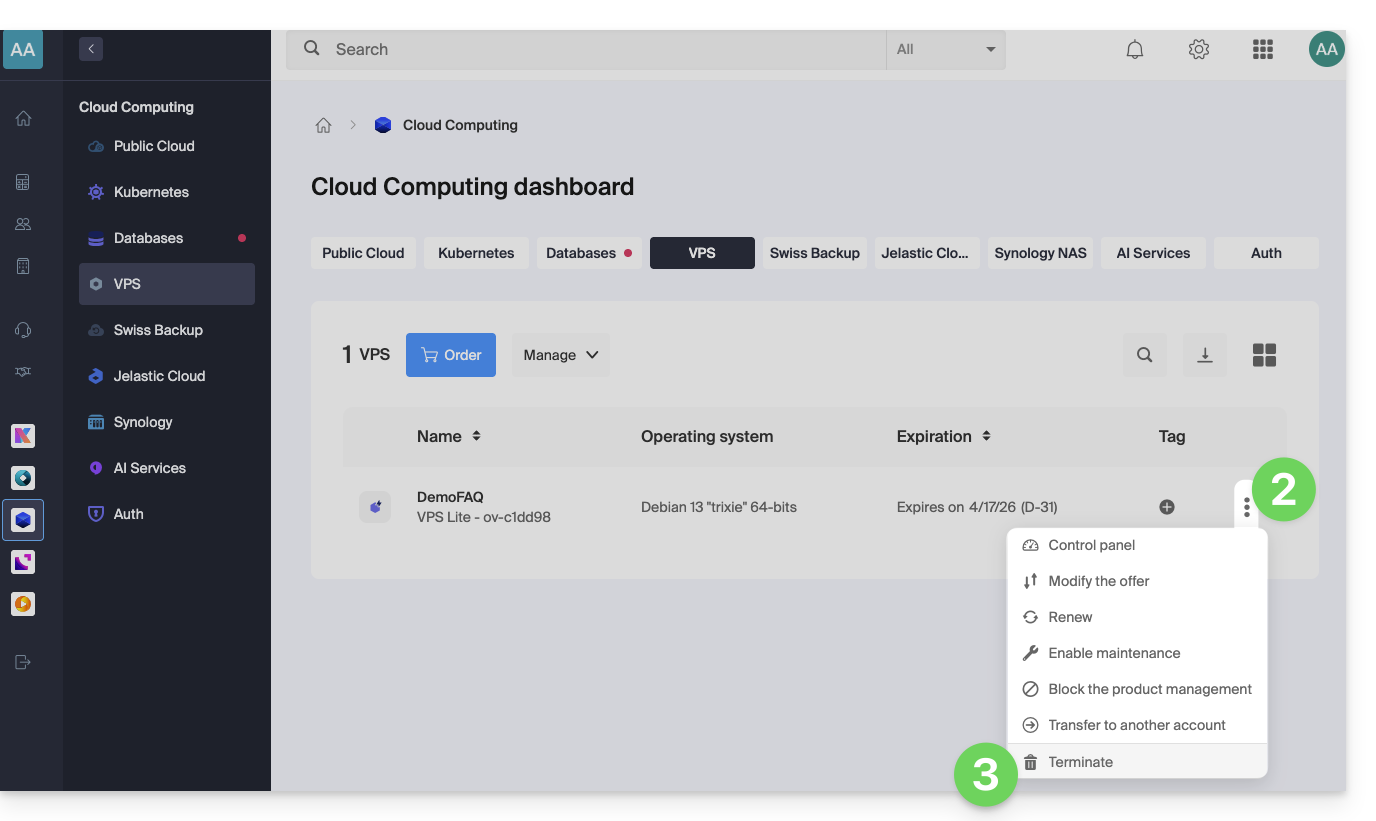
- Follow the procedure to the end.
Link para esta FAQ: https://faq.infomaniak.com/1702
Esta seção de perguntas frequentes foi útil?