Base de conhecimento
1000 perguntas frequentes, 500 tutoriais e vídeos explicativos. Aqui, você encontra apenas soluções!
Secure a video stream by domain restriction
This guide explains how to restrict access to Infomaniak's Video Streaming streams to your own site only.
This protection does not prevent the integration of a stream via an HTML iframe tag. Use the unique hash protection for a higher level of security.
Restrict access to broadcasts to a domain
To do this:
- Click here to access the management of your product on the Infomaniak Manager (need help?).
- Click directly on the name assigned to the product in question.
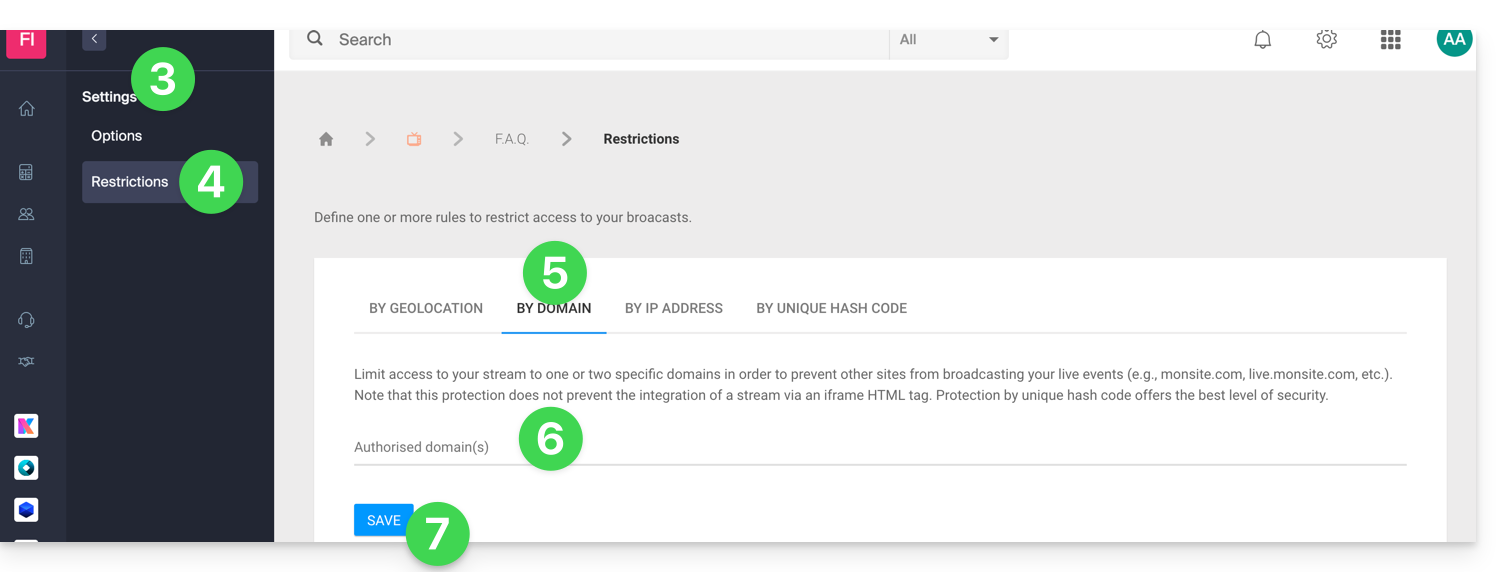
- Click on Settings in the left sidebar.
- Click on Restrictions in the left sidebar.
- Click on the Domain Restriction tab.
- Define the sites that should be specifically authorized to load the stream.
- Click on the Save button:
Refer to this other guide to customize the replacement image offered to blocked viewers.
Link para esta FAQ: https://faq.infomaniak.com/1543
Esta seção de perguntas frequentes foi útil?